The Gorgon Defender App

Full visibility and control over your network security — from anywhere. Monitor threats, manage decoys, and respond to incidents in real time across all your devices.

iOS
Android
Windows
macOS
Linux
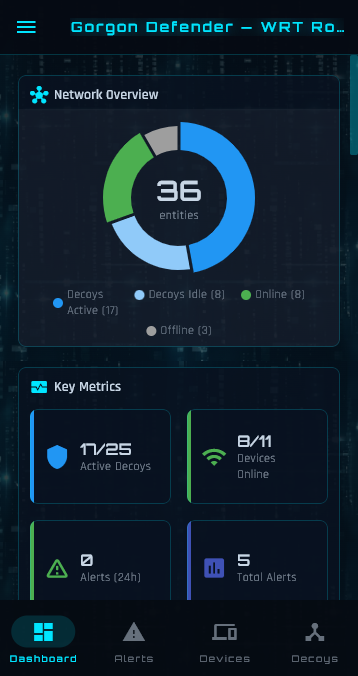
Gorgon Defender dashboard on mobile showing network overview donut chart and key metrics

Your Network at a Glance

The dashboard gives you an instant overview of your network's security posture — decoy coverage, device status, alert trends, and live packet activity — all in one place.

  • Network overview donut chart with decoy and device breakdown
  • Key metrics: active decoys, devices online, alert counts
  • Alert activity bar chart with 24h / 7d / 30d severity breakdown
  • Real-time packet load line chart with interactive tooltips
  • Live OpenStreetMap showing your router's GPS location
  • Server syslog and device timeline widgets
Gorgon Defender dashboard on Windows widescreen showing 3-column layout with 9 configurable cards

Fully Configurable Layout

Enter edit mode to drag-and-drop cards into any arrangement. Add widgets, remove ones you don't need, rename titles, and reset to defaults — your layout saves automatically.

  • Drag-and-drop card reordering with visual drop zones
  • Add or remove cards from a catalogue of available widgets
  • Custom card titles — rename any widget to suit your workflow
  • Responsive: single column on mobile, two on tablet, three on widescreen
  • Layout persists across sessions on every device

Threat Detection & Alerts

Real-time detection of port scans, network reconnaissance, and unauthorised access attempts — with intelligent classification and instant push notifications.

Three-Tier Alert System

Alerts are automatically classified by severity: informational (new devices), warnings (first decoy contact), and critical scan detection (port scans, network sweeps, ARP scans). Each tier has distinct colour coding for at-a-glance triage.

Push Notifications

Receive instant push notifications the moment a threat is detected. Configure per-severity filtering so you only get alerted on what matters to you — informational events, warnings, or critical scans.

Breach Overlay

When a new threat is detected while you're using the app, a full-screen pulsing overlay immediately captures your attention with threat details. Tap to dismiss and navigate directly to the relevant alert.

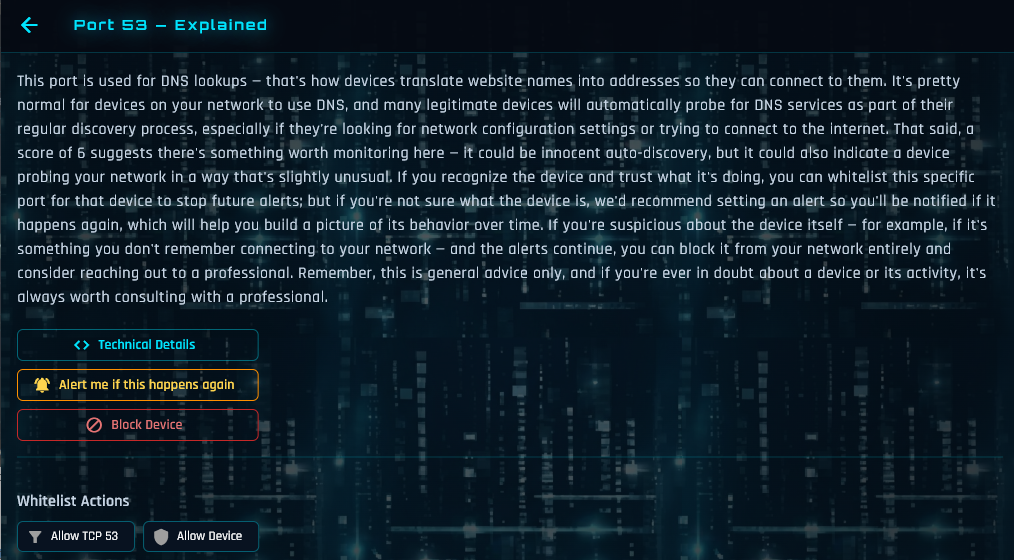
Threat analysis screen explaining Port 23 Telnet contact with actionable security advice

Extensive Threat Analysis Library

Don't just see alerts — understand them. Every suspicious port contact comes with a detailed, plain-language explanation telling you exactly what the activity means, why it matters, and what to do about it.

  • Natural-language explanations for every port and protocol
  • Risk assessment with contextual security advice
  • Technical details available for advanced users
  • One-tap actions: set alerts, block devices, whitelist trusted traffic
  • Scan detail drill-down with port breakdown, hit counts, and service names

Deception-Based Defence

Deploy ghost honeypot hosts that are invisible to legitimate users but irresistible to attackers. Any contact is a guaranteed threat indicator.

Ghost Decoys

Create honeypot hosts with unique MAC addresses, DHCP-assigned IPs, and realistic hostnames. They appear as genuine devices to attackers but generate zero false positives — any contact is a confirmed threat.

Device Mimicry

Decoys can mimic real devices on your network — copying their hostname, vendor signature, and DHCP fingerprint. Attackers cannot distinguish decoys from genuine hosts.

Autonomous Mode

Enable autonomous decoy management and the system will automatically create, position, and schedule decoys based on your network's activity patterns — no manual configuration needed.

Network Visibility

Know every device on your network, its behaviour patterns, and exactly when something changes.

Device Discovery

Automatic passive discovery via ARP, DHCP, mDNS, SSDP, NBNS, and LLMNR. Every device on your network is identified with its MAC address, IP, hostname, and hardware vendor.

Activity Heatmap

A 7-day by 24-hour activity heatmap for every device shows when it's typically active. Understand usage patterns and spot anomalous after-hours activity at a glance.

Device Blocking

Block suspicious devices with a single tap. Choose internet-only blocking (device stays on LAN but loses WAN access) or full network isolation for complete quarantine.

SIEM integration configuration dialog with syslog server, port, CEF format, and severity filters

Enterprise & SOC Integration

Extend your corporate security perimeter to employee home offices. Built-in SIEM integration forwards alerts to your SOC in real time — with full context about which site, employee, and location is affected.

  • Syslog forwarding via UDP — CEF or JSON (RFC 5424) output
  • Severity-filtered: choose which alert levels reach your SIEM
  • Every message includes serial, site ID, public IP, and GPS
  • Fleet-ready: pre-load SIEM config before deploying routers
  • Serial rotation and one-time invite codes for secure sharing

Secure Remote Access

Monitor and manage your network from anywhere in the world with end-to-end encrypted tunnelling and flexible access sharing.

End-to-End Encryption

Remote access uses a TLS-over-WebSocket tunnel through our cloud relay. The relay is a blind pipe — it cannot read your traffic. Two-factor authentication with serial number and relay secret.

One-Time Invite Codes

Share access securely with family members or IT administrators. Generate a short code that grants remote access. Codes expire after 24 hours and are automatically consumed after use.

Remote Access Audit Log

Every remote login is recorded with IP address, GPS coordinates, and reverse-geocoded location. View login locations on an interactive map — know who accessed your network and from where.

Language selector showing 9 supported languages with flags, app displayed in Spanish

Customisation & Localisation

A polished, adaptable experience that fits your brand, your language, and your users. Every string in the app is translatable, and the entire UI adapts to right-to-left scripts.

  • Many languages, including English, Arabic, Danish, French, German, Hebrew, Japanese, Polish, and Spanish
  • Full right-to-left layout support for Arabic and Hebrew
  • CJK font rendering for Japanese with automatic fallback
  • Light, Dark, and Cyberpunk themes — or replace with a corporate theme
  • Full white labeling: app name, logo, splash screen via config file
  • Guided setup wizard in every language

Over-the-Air Updates

Keep every deployed device up to date — securely and automatically.

Automatic Firmware Updates

Firmware updates are delivered via secure cloud infrastructure with SHA-256 verification. The app shows release notes, tracks progress, and automatically rolls back on failure.

Compatibility Protection

The app automatically detects outdated router firmware and guides users through the update process. Semantic API versioning ensures the app gracefully adapts to both older and newer server versions.

Ready to Secure Your Network?

Gorgon Defender is available for ISPs, telcos, router manufacturers, and enterprises looking to add autonomous intrusion detection to their products.

Get in Touch